Blog / Architecture
Architecture · HomelabLow-cost video surveillance
As is usual in my projects, I often look to recycle old technology or use the lowest budget possible. My home's security is no exception.
01The reason that gave the project life
One night while I was studying I heard a noise; I didn't pay attention to it because I have neighbors who tend to be night animals like me. The next day I found out about a possible attempted break-in at a nearby house.
This made me realize the precarious security of my own house. That is why I started looking for security cameras and alarms online. The problem is that things like this can be quite expensive and they do fairly simple things seen from the technical angle. That is why, as a good engineer who sees the real complexity behind products, I fell into the thought of "I can build it myself." Even more so considering that I was already working with Nabu and with ESP32 microprocessors for different little test projects.
I went into the old reliable aliexpress and bought a couple of ESP32CAM initially, with the intention of later adding door and window sensors. Also, combined with Nabu and its internal storage, I could leave it CCTV-style, recording constantly for several days considering the resolution of the cameras.
02Not all cameras are the same
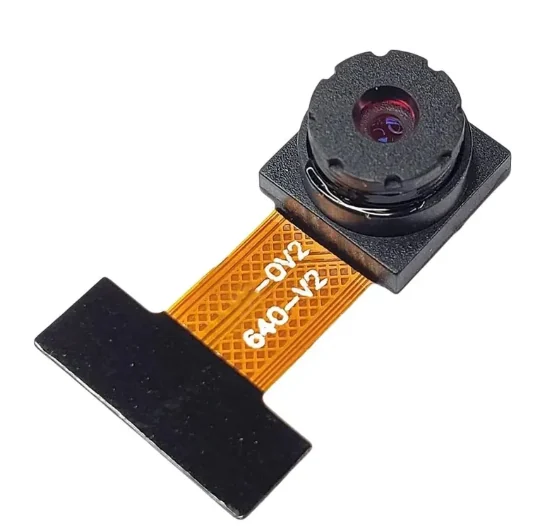
This section, besides telling my experience, is also a recommendation in case whoever reads this wants to do it on their own. Not all ESP32 cameras are the same. I personally had to learn it when my order arrived from china, since it had two different sensor models: OV2640 and GC2145. The main difference between them is not a matter of power, it is of sensor family. On one hand we have the OV2640 sensor which is very well documented and all the projects I managed to find as examples used this sensor, while the GC2145 is less documented and it cost me quite a bit more to get it working.
03Where my server comes into the scene
To connect these cameras and get them working, you need to configure the wifi access point and password in the code. Once that is done, you just need to connect an old 5V phone charger to the wall and connect it by usb C to the cameras.
The real problem comes here: When I started the camera and accessed its ip on my LAN from my phone, the buffer generated a stream without issues, but when I opened the video at the same time from my computer, the image froze and both streams dropped.
The above happened independently with both cameras, so, besides having to solve this problem, I had to find a way to see both cameras simultaneously, without having to change the address I accessed each time. The solution was much more intuitive than I imagined at first and I derived it from a documentary about how the 2025 football world cup was broadcast, which explained that to do multi-broadcasts to different television channels, without having to generate a stream for each of them, a single one is generated to a central server, which could process this video, add all the transitions between shots and then a multi-broadcast was done to each of the channels separately. This is called the "producer-consumer pattern" and is used in events like this. (as shown in this image).
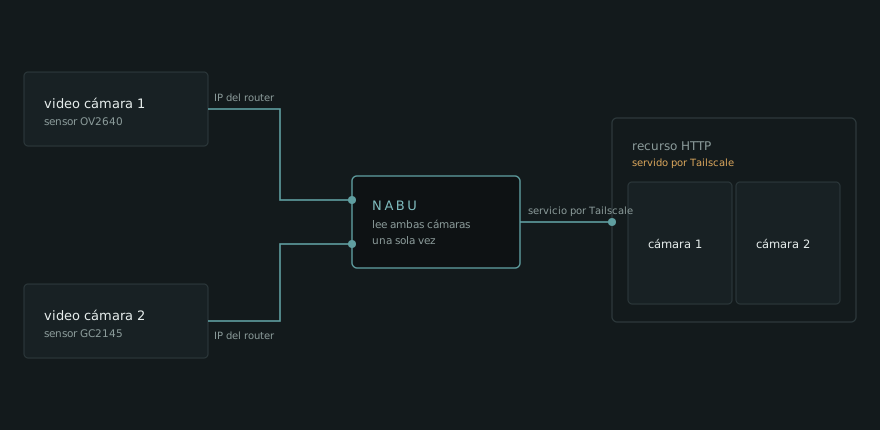
I figured that this scheme was an elegant solution, which gave me the opportunity not only to control and process the image of both cameras in a single web page that queried Nabu over tailscale from anywhere in the world, but it also helped me not to expose services from my closed LAN to the outside without having to go through Nabu, which would break the whole purpose of having a LAN with no internet access.
04The crash
Up to this point the project was going well. The real problem came up when I started to notice that every so often, the camera with the GC2145 sensor (approximately every 1 hour consistently) cut the stream and the signal was lost, leaving the image frozen on a frame of the video. This initially made me think the code could be failing, but actually after reviewing it together with the serial monitor of the arduino IDE I managed to notice that it crashed from exceeding the limit of the buffer used. That is, the camera's ram memory was not holding up the constant video stream.
Initially I thought that could be the tombstone of the project, but after researching a bit more I discovered that esp32 cameras not only have RAM memory ( ~320-520 KB), but also a PSRAM memory that is larger (~ 4-8 MB), but as a consequence of much higher latency (1/10 of the speed of the RAM). When I tried this memory for the camera's buffer I noticed that it actually only gave half a second to 1 second of latency in the transmitted video, nothing that would affect the viewing in the long run.
The only thing I had left to solve, and what I put in as a safeguard, was to do an automatic restart inside the firmware so that if it detected it was not connected to the LAN it would restart the system every so often (the timer was set to avoid it restarting in case of an immediate LAN drop).
In parallel, I designed a contingency plan for the event in which the memory was overwhelmed, in which case it would send an automatic restart to the camera without having to wait any time.
05Recording on Nabu
At this point the system was already working, and it was time to move on to the last step to solve: being able to record these cameras constantly in order to get replays if ever needed.
To do it I had to use my server's storage and, doing calculations with Claude's help, I was able to determine that I had the autonomy to record more than 20 days continuously, using the same stream that the server received from the cameras independently.
This calculation was done based on the H.264 bitrate, which already reflects the resolution and the fps, determining how much a 10-minute segment weighs. (the recordings are kept in 10-minute pieces to avoid losing a whole video file when a camera is down, a period during which the camera's input is not recorded).
With this and a rule of three, we can get how many days of recording we have considering that I left approximately 100 – 150 GB of storage just for recordings.
At the end of a 20-day period, the oldest recordings are deleted, freeing up space so as not to saturate the memory.
Finally, all the recordings are accessible over tailscale by connecting to Nabu and are saved in a directory created specifically for this.
06Conclusions
This project started by solving a real need, guiding me into a path of knowledge that, in part, I already had, since the use of ESP32 was something I had from earlier, smaller-scale projects related to motion, temperature and noise sensors, but which meant a new learning in the use of ESP32 cameras. Considering also that I already had experience in image processing with my works published in the IEEE on iris tracking with low-resolution cameras, (Check my CV on this page to find the publication), this challenge motivated me to venture into microprocessors as working resources for this self-hosted system.
What could I take away from all this? The knowledge of producer-consumer streams and its application at a smaller scale helped me understand how closed CCTV systems work and that, despite having had problems that I could solve with research, they are not that complex as a service, which contrasts with the high prices that are often paid for complete systems like these and that not only cost a lot, but also do not give any guarantee of being inaccessible to third parties due to being exposed to the internet.
What I have described is what made it interesting to me and pushed me to dedicate this post, since these are systems that work every day in plain sight of everyone and even though I already had technical knowledge on the subject, they also let me exemplify that buying systems like these is only a matter of "taking it out of the box and using it" rather than "it is a complex system", a concept that people often confuse, thinking that they have total control over the products and systems they use.
It is true that the cameras I bought are of very low resolution and value (not exceeding 10 dollars), and even though that was the magic of the project, it also leaves room for improvement, buying ESP32 cameras with higher-resolution sensors, which also does not raise the value so much as to still want to buy a pre-fabricated system (considering the downsides of using cloud systems for home security).
To finish (and seeing it from a security perspective), as in other projects, it is the dependence on Nabu to keep these services active that remains a challenge, since if the server were to go down, with it, in a domino effect, the streaming and recording of the cameras would go down.
This is not urgent for me right now, although I have considered solutions such as: First, separating the recording and streaming services into different nodes of the LAN, so that transmitting and recording does not depend on a single machine, also allowing me to have storage exclusively for the recordings and possible data processing in the future. Second, there is the fact of having such low RAM in each camera working on video streaming and crash detection at the same time. That is, in the future, if I wanted to invest a bit more in this, I could add an ESP32 and handle the streaming separately on each camera, so as not to depend on all of each one's ram to stay alert in case of LAN drops or of the ESP32CAM itself.