Blog / Architecture
Architecture · HomelabCan you sell this?
How a notebook meant to be discarded and with no purpose found a new home and is now the one in charge of keeping all my services out of the cloud and keeping my home secure.
01The errand
It is common in my house that members of my family, when they upgrade phones or notebooks, ask me to put the old ones up for sale to get a bit of money back from them.
This was the specific case of a zenbook notebook from 2019 that, due to a lack of windows updates, dust and dried out thermal paste, no longer worked well.
At that moment I didn't know exactly how to do this kind of maintenance. Only a couple of years ago did I venture into this and I managed to revive it by opening it, cleaning it, changing the thermal paste and reinstalling the operating system, specifically with ubuntu server, which, as I looked into it, opened up a world of possibilities for me and not only let me start a homelab that has kept growing to this day, but also forced me to study technologies that I knew of but never thought I would have to implement (some of which I have already mentioned in other posts), such as UFW rules, VPN through tailscale and also different services like SAMBA for managing my files, ssh for the connections, jellyfin for my multimedia services, docker and various other services that I kept adding and dropping not only with the intention of learning, but also to shape along the way my real intentions for running a server at home, which, honestly, was not clear at the beginning beyond having a weekend project.
02Why a server of my own and not the cloud?
This is a trick question, since many people defend self hosted services to "get away from the hands of the big companies" and others simply see it as a good hobby.
My opinion, after a couple of years in this, falls in the middle, since on one hand I do think it is important to be careful about what parts of our personal information we give corporations access to and what parts we don't. I have also learned that self hosted services in homelabs or private servers allow a lot of room to get into the physical segment of the equipment, as well as that certain functions are much more effective, like home security and control; also being able to access private vaults of information that let me be, up to a point, calmer about storing personal information, like backups of devices, travel photos and things that many times are better not shared for exposure reasons, and even being able to control the traffic on my network to detect external attacks or create labs with docker to practice cybersecurity attacks in controlled environments.
Don't get me wrong, I still use cloud services because they are obviously more accessible without so much need for configuration. The simplest example is google with gmail and drive, or my internet host where this site is hosted, since if I did it self hosted on my server I would lose some of the point of my intention with Nabu, which is to get away from the security problems that come from exposing a server to the network.
On the other hand, the main problem of self hosting that I deal with today is the data loss and service outages that could happen if something were to happen to Nabu, which I have to be monitoring every so often because I am the creator and the only technician that looks after it. This is what gives me the most satisfaction about having a homelab, that it is a responsibility that lets me feel that I have total control of the system.
03The name
Here my geekiest side will show (very common in the culture of a computer engineer) which, although it sounds cliché, will always have to do with video games, science fiction movies and fantasies that simply sound great on paper.
That is why for the name of my server I went through a lot of ideas, but as a Star Wars fan I started looking for names related to that universe. While doing this, and with a bit of help from AI, I arrived at the name of a Mesopotamian god called Nabu, who is the god of writing. That seemed perfect to me, considering that the server would be in charge of writing and saving my information constantly.
When I read this name it immediately sounded to me like Naboo, which, for anyone who doesn't know, is the home planet of princess Padme and emperor Palpatine in the Star Wars saga. Besides being short and precise, it also sounded to me like Jarvis from Iron man, something like "let me connect to Nabu" in case I needed it.
That is how this companion was born, one that has been and keeps growing through services and new devices that I have been connecting around it to not only improve its functions, but also to try out new architecture setups.
04What it used to run and what it runs today
Today Nabu is no longer alone in my ecosystem. Over time I have been adding new components like a mac m1 that I had from my university days, which today serves for my docker and artificial intelligence labs and lets me run small models, plus a raspberry pi 4 and a raspberry pi zero 2 w that I use to build vulnerable machines that I attack from Nabu, which at the same time hosts a docker with kali linux.
On top of these machines, I have also worked with esp32 microcontrollers, among which some talk to Nabu for security cameras (esp32Cam) with CCTV type recording, which I can watch in real time from my phone through Nabu, which brings up an http service to be able to monitor them and record into the server's internal storage (This is a bigger project that had its own difficulties, so I won't go too deep here).
The latest upgrade I have with this server is the use of a switch to connect absolutely all of these devices, so Nabu, the mac m1, the raspberry pi 4 and my lan router talk directly through it so that Nabu can manage the traffic of all of them without having noise in the middle from using wifi, allowing a greater bandwidth both for file transfers and for the recording of cameras connected to the router and recorded on nabu.
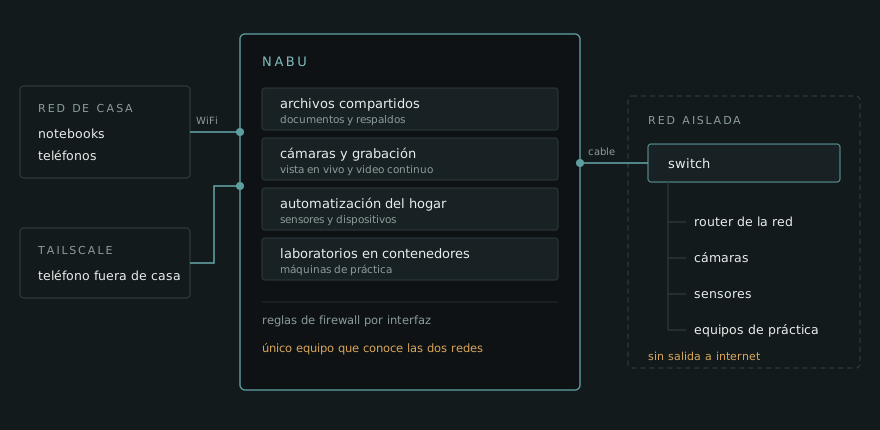
It wasn't always like this. At the beginning Nabu was only a notebook with ubuntu server and docker. In that period I tried a lot of apps and functions found on forums like reddit, such as SAMBA, Jellyfin, Adguard, Pihole, tailscale, home assistant, tmux, cron, etc. All of these were worked on in docker, but after new architecture kept being added to the system I started at that point to delegate functions as I already mentioned with docker that went to the Mac, piHole on a raspberry pi zero 2 w or the kali linux machines on live USB devices with persistence.
05One of the many problems
The road to implementing this had several obstacles, among them and the most important ones I think I have to mention are external access with tailscale and the interconnectivity between devices with UFW rules.
Since Nabu works as a closed server from which I manage the rest of the resources, the first goal was being able to connect from anywhere in the world. This with the intention of being able to reach my files and machines if, for example, I was traveling. That is why solutions had to be looked for and I arrived at a free service called Tailscale, which lets you create a VPN network between your devices with a switch inside the app, making it possible to connect to it or disconnect from it, which I can have on my devices and when I turn it on I connect to this network with Nabu as an exit node, that is, I can choose whether or not to send my traffic through Nabu. That allows controlling everything that comes in or goes out of the network securely without having to worry about information leaks that the devices might have between themselves. For this I had to install ssh on nabu and configure it with public access keys to give the access an extra layer of security.
On the other hand we have the connection between devices, which comes from the simulated labs that I built out of Nabu and that many times had to simulate machines that don't have direct access to others and are blocked by firewall so they can't be seen by anyone other than certain accesses, putting to the test machines and labs that let me practice lateral movement between services. That is why I started setting UFW rules (which at the time I had no idea even existed), to start blocking access between machines, only going through Nabu, creating access chains that I could keep mutating and creating new labs from.
These implementations had their own challenges in themselves, but the issue I couldn't solve right away and that forced me to look for solutions was the fight between the two network cards. Today Nabu works with two interfaces. One towards my private LAN, where the labs and the cameras live, and another towards the ISP network. At the beginning the two competed for the default route, because the LAN router also offered its own gateway through DHCP. The result was that my homelab spent a good while without access from the outside: Tailscale simply didn't reach Nabu, because the traffic was trying to go out through the wrong interface, the one that has no internet. The solution wasn't in the firewall, but one step before, in the network configuration. With netplan I told the LAN interface to take its IP address normally, but not to install a default route. That way there was a single way out to the internet, the ISP one, and Tailscale worked again. The LAN interface kept doing its job inside the isolated network, but it stopped fighting over something that wasn't its business. Where UFW did come in was afterwards, to decide which service is visible through which interface. Working out where the traffic goes out is not the same as working out who can touch each service: the first one is routing, the second one is firewall, and it took me a while to understand that I was mixing two different layers.
06To do list
It is true that this project is much bigger than what can be explained in a post like this one, not only because of the technologies used, but also because of the many things that can slip past me being the only individual configuring them, but even so I am aware that there are clear improvements pending, not only at a hardware level, but also basic (and very important) things in this case like backups in case Nabu's storage dies or some system breaks. This is the most urgent thing on my list and since it is a low cost project, I keep looking for options to solve it.
The subject of power sources in case of blackouts is something that isn't urgent for me, since currently, the machines holding the information being desktop-style ones like notebooks, in case of a blackout the machines' own power gives me time to save changes and shut them down properly.
07This taught me
If Nabu taught me anything it is that a home server isn't designed up front, it takes shape along the way. I didn't know what I wanted it for when I installed Ubuntu Server on it: I only wanted to see if the notebook was still good for something. The purpose kept appearing with use, trying services that I later removed, delegating functions to other machines when the project grew and discovering that half of the things I installed out of curiosity I didn't need. That part, the one about removing instead of adding, ended up being as important as the other one. The second one is less comfortable: Having your own cloud means that availability stops being something that comes included and becomes a decision of yours. Nobody is going to restart a service that went down at three in the morning, nobody has a copy of your files in case the disk dies and when something breaks there is no one to write to. That, which sounds like a disadvantage, is exactly what forced me to learn networking for real, to understand why the traffic was going out where it shouldn't and to worry about backups before needing them. No course would have taught me that as fast as a homelab that stopped responding while I was far from home.