
Blog / Logbook
Logbook · WardrivingDiscoveries from Wardriving
Although I know this is a form of information gathering that can be misused, the truth is that it is also useful for detecting easy-to-fix problems in my own networks and those of my family.
To date, the posts on my blog have tried to show my projects applied to my own home and I have not taken on the task of delving into my cybersecurity studies, which I think are much more theoretical than practical. However, every day I like to try things that catch my attention to polish my practical side in an educational and ethical way, obviously staying within the framework that the law allows me, unless it is in my private laboratory, which I have already talked about in my previous posts.
One of the topics that caught my attention is wardriving, a concept I came across while working with maps and Osint, realizing that applying it can be fun, since it means going out to walk and try this in the "real world".
01What is wardriving?
When you go into the wifi networks menu to connect at your work or home, have you asked yourself exactly how much information you give away and who could obtain it?
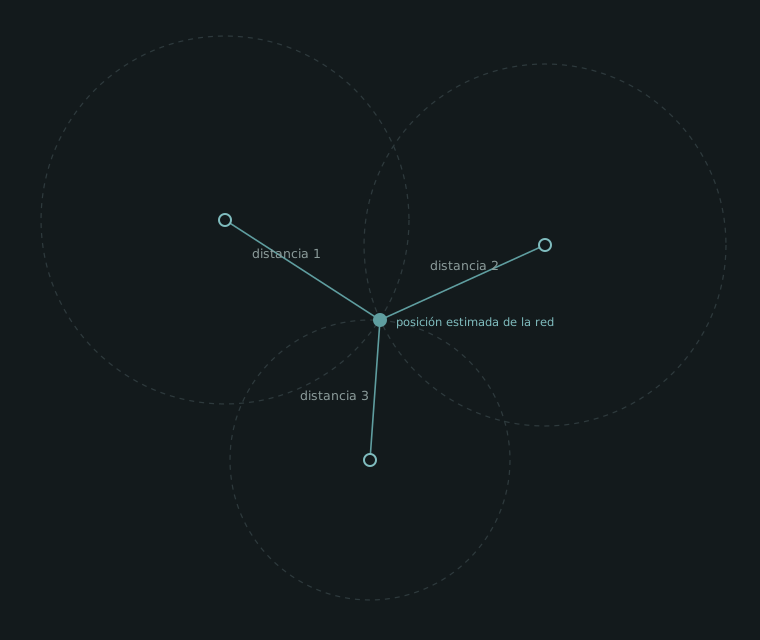
Well, basically that is wardriving but with a bit of "extra". This information gathering method can be done with a phone with root access and a couple of apps that allow you not only to know relevant information about your wifi such as SSID (network name), MAC and type of encryption (WEP, WPA, WPA2), but also show the strength with which you perceive the signal, which combined with the phone's gps, can generate a heat map of possible gps points where these networks are located. This is done by contrasting the signal strength information together with the gps. That is why if 3 or more routes close to a network are made, we can triangulate an estimated position.
02Network encryption
To understand the findings we will see next, I must explain a quick concept about the forms of encryption used in networks.
Currently WPA2 and WPA3 are used in almost all home networks (the latter not so much since it was introduced only in 2018), which has become standard for its robustness in terms of encryption.
On the other hand we have WPA and WEP. In these there is a higher level of active vulnerabilities due to how old they are (WEP is from 1997 and WPA from 2003). These types are almost no longer used and it is recommended not to use them because of their low level of robustness.
On one hand we have WEP which has bad encryption, so by capturing enough network traffic the password could be reconstructed in minutes with tools like aircrack-ng regardless of the length it has.
On the other hand we have WPA, which uses the now obsolete TKIP encryption, carries known weaknesses and also shares with WPA2 the risk that, by capturing the handshake, the password can be attacked by dictionary if it is weak.
Lastly we have something that is not a type of encryption, but an option added in 2007 to allow devices to connect by pressing a button and not having to enter a password. I add this option in this explanation, since it will be more important later in the post.
03Findings
Now, what can we do with this?.
The truth is that without crossing the ethical and legal limit, not much, since this information is saved on a map and not much more.
What I did find interesting to analyze from this is the amount of networks with bad configurations. For obvious reasons I will not share any personal information in this post, but I can give numbers based on my findings:
Total distance covered: ~ 3 Km (3 different walks on different routes)
Total recognized networks: 1030 networks
Total 2.4 GHz: 502 networks
Total 5 GHz: 528 networks
Total networks without password: 0
Here comes the important part. Based on the information collected I generated a python script that would review this information and separate it into categories LOW, MEDIUM, HIGH and CRITICAL according to the level of bad configuration these networks have, with the results as follows:
LOW: 275 networks, those that have WPA2 and without WPS activated
MEDIUM: 22 networks, unknown encryption that was not identified in the scan.
HIGH: 729 networks, which have WPS activated
CRITICAL: 4 networks with WEP
04What I did from this
The first and most obvious thing I did was to look for my networks to realize that both, out of the factory, come with WPS configurations activated. This means they are potentially vulnerable to PIXIE DUST attacks, although this depends on the type of firmware the router uses.
Pixie Dust is an attack that exclusively exploits the activated WPS configuration. It works as follows:
The router, when it receives a request to associate via WPS, sends 2 "hash" type messages that it calculates from the pin with secret nonce codes. The problem comes here. Many of these nonces come by default with zeros or predictable keys, which can be deciphered offline by obtaining these first two messages sent by the router.
And here is the serious part: once the PIN is broken, the router hands over the real WPA2 password — it doesn't matter if you have a 20-character key, WPS gives it away through the back door. That is why an attacker ignores "secure" WPA2 networks and goes straight to those that have WPS turned on.
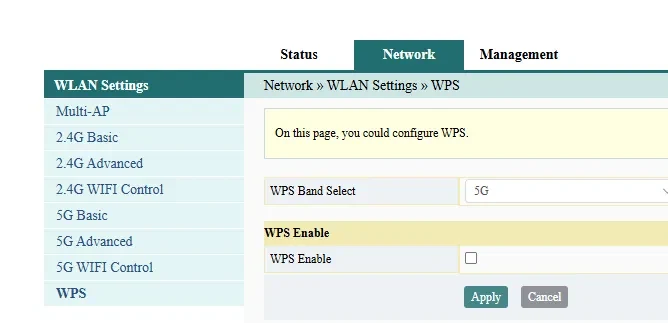
Needless to say, after these discoveries and analysis the first thing I did was fix the problems in my own network. This was quite simple and I leave it for whoever needs it and wants to try it: I entered my router's address (it is usually 192.168.1.1 but it can vary depending on the ISP and the router) and with the router's admin user and password (credentials that if you have not configured are very likely stuck under your router). Inside the configuration panel, look for the WPS option and disable it.
05Conclusions
This practical experience forced me out of the desk and made me contemplate and understand what is always said, but since it is not something physical and tangible is not internalized: that everyone is vulnerable and that there are many badly configured devices, but obtaining a REAL sample of this with more than 71% of the networks with weak configurations or exposed WPS generated an immediate concern in me. If I, with tools that anyone has at hand, could not only map my environment but confirm in practice that the flaw was real (I verified it on my own router, in my laboratory and with my own equipment, before fixing it), anyone with the same curiosity could reach the same point.
I am not going to get into the how or what I obtained at that stage. It is beyond the focus of the post and above all, it is the kind of detail I prefer to leave out for obvious reasons. Suffice it to say that the complete cycle: reconnaissance, analysis and verification of the vulnerability on my own network worked from beginning to end.
The experiment personally was a success, I managed to execute a passive wardriving of more than 1000 networks, I did analysis of this data and I managed to exploit vulnerabilities in my own laboratory from this collected information.
I consider this practical and real experience of how the criminal's mind thinks. Someone who did not only walk through residential areas as I did, could apply it as a reconnaissance exercise on a larger scale, for example in business sectors where networks are much more sensitive and can mean greater harm.
To finish, what stayed turning in my head the most: nothing I found was hard to fix. The 7 out of 10 networks with WPS or WEP are not exposed for lack of technology, but because no one entered the panel to turn off an option. The same reconnaissance that an attacker uses to choose a target is the one a consultant uses to shield a client. Same technique, opposite intention. And that is the reading that interests me, understanding how one attacks to know what to defend. If after reading this you checked your own router and turned off WPS, the post fulfilled its objective.